
Windows 10 Mobile
The last Windows phone OS – unified ecosystem, Continuum for desktop, and enterprise security in your pocket (2015–2020)
Overview
How It Works
1. UEFI on ARM & Secure Boot
The device’s ARM firmware (UEFI) verifies the bootloader signature. Secure Boot ensures no unauthorised OS loads.
2. OneCore Kernel & HAL
The ARM‑specific kernel loads hardware abstraction layer (HAL) for Qualcomm Snapdragon SoCs (radio, sensors, camera, battery).
3. Adaptive Shell & Start Screen
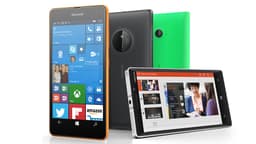
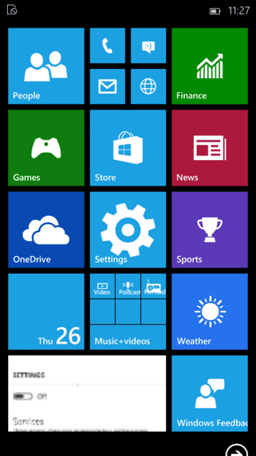
The phone shell loads – a vertically scrolling Start Screen with live tiles (instead of desktop Start Menu). The interface is touch‑optimised.
4. Cellular & Telephony Stack
The radio interface layer (RIL) initialises VoLTE, SMS, and data connectivity. The Phone app integrates with Skype (for VoIP).
5. Continuum Mode (if docked)
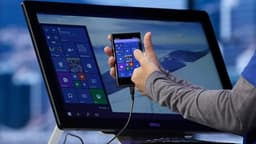
When connected to an external display via Continuum Dock, the OS launches a desktop shell on the monitor while the phone screen becomes a trackpad or continues its own UI.
6. Background Tasks & Battery Saver
Apps use background tasks (not full processes) to preserve battery. The OS suspends inactive UWP apps automatically.
Key Features
Continuum for Phone
Connect your phone to a monitor, mouse, and keyboard – use it like a desktop PC. UWP apps resize and run in windows on the big screen.
Universal Windows Platform (UWP)
The same app runs on phone, tablet, PC, Xbox, and HoloLens – with adaptive UI for each device.
Windows Hello (Iris Scanner)
Biometric authentication via infrared iris recognition (Lumia 950 series). Unlock phone and authorise payments securely.
Action Centre
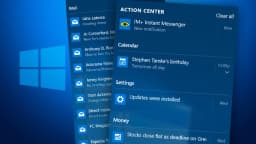
Swipe down from the top for quick settings (Wi‑Fi, Bluetooth, rotation lock, brightness) and bundled notifications – similar to Android/iOS.
Microsoft Edge
Mobile version of Edge with reading view, favourites sync, and password manager. Shared the same rendering engine as desktop Edge.
Office Mobile (Universal)
Word, Excel, and PowerPoint pre‑installed – with near‑full document compatibility. Continuum made editing spreadsheets on a monitor productive.
OneDrive Integration
Automatic camera roll backup, file sync, and cross‑device access. Files on‑demand (cloud files visible without downloading) was available.
BitLocker & Enterprise Security
Full‑device encryption, MDM enrolment, VPN, Work Folders – enterprise‑grade security on a phone.
Live Tiles Start Screen
Customisable Start Screen with live, flipping tiles showing notifications – a unique visual identity of Windows phones.
Skype Integration
Skype built into the Phone app – VoIP calls and messaging merged with traditional cellular SMS/MMS.
Continuum for Phone: Your PC in Your Pocket
Connect to a monitor, keyboard, and mouse – use your phone like a desktop
How Continuum Works
Continuum uses Miracast (wireless) or USB‑C / HDMI (wired) to project a Windows 10 desktop interface onto an external display. The phone itself becomes a trackpad or continues to run phone apps independently. Supported UWP apps (Office, Edge, Store) resize and behave like desktop apps.
Required Hardware
Only high‑end Lumia phones (950, 950 XL, 1520, and HP Elite x3) supported Continuum via Microsoft Display Dock (HDMI, USB, Ethernet). Most mid‑range devices lacked the video output capability.
App Limitations
Only UWP apps optimised for Continuum would work; traditional Win32 apps (exe) could not run. This severely limited productivity software availability.
Legacy & End of Life
Microsoft abandoned Continuum after Windows 10 Mobile. The concept later evolved into 'Your Phone' (phone screen mirroring) and 'Link to Windows' (Samsung partnership).
Universal Windows Platform (UWP) Apps
One app for phone, tablet, PC, Xbox, and HoloLens
Write Once, Run Everywhere
UWP apps use responsive design – the same code adapts to screen size, input (touch/mouse/pen), and device capabilities. Developers could target the entire Windows ecosystem with one app package.
App Store (Microsoft Store)
Windows 10 Mobile accessed the same Microsoft Store as PC. Purchased apps worked across devices. Popular apps included Facebook, Twitter, Netflix, and Microsoft Office (Word, Excel, PowerPoint).
The App Gap Problem
Developers prioritised iOS and Android. Many major apps (Snapchat, Google apps, banking apps) were never released for Windows 10 Mobile, leading to platform decline.

Windows Hello (Iris Recognition)
Secure biometric login on supported Lumia phones
Iris Scanner
Lumia 950 and 950 XL featured an infrared iris scanner. It authenticated users by scanning the unique patterns in their eyes – even in the dark. Security was comparable to fingerprint sensors.
Integration with Wallet & Apps
Windows Hello unlocked the phone, authorised Microsoft Wallet payments (NFC), and signed into UWP apps that supported biometrics.

Enterprise & Security Features
BitLocker, MDM, VPN, and Secure Boot on a smartphone
BitLocker Device Encryption
All Windows 10 Mobile devices had full‑device encryption enabled by default (using the TPM-like security on Qualcomm chips). This protected corporate data if the phone was lost or stolen.
Mobile Device Management (MDM)
Organisations could manage Windows 10 Mobile phones via Microsoft Intune or third‑party MDM (VMware AirWatch, MobileIron). Policies enforced PIN complexity, jailbreak detection, and app whitelisting.
VPN & Work Folders
Built‑in VPN client supported IKEv2, L2TP/IPsec, and SSTP. Work Folders synced corporate files securely without full device enrolment.
Secure Boot & Firmware Protection
Prevented unauthorised OS flashing – similar to Android’s verified boot.

Cortana Integration
Your phone’s voice assistant that syncs with your PC
Deep System Integration
Cortana could send texts, set reminders, create calendar events, search the web, and control music – all with voice. It synced reminders and notifications with the Windows 10 PC.
Missed Call & SMS Notifications on PC
With Cortana, you could dismiss phone calls or reply to texts directly from your Windows 10 desktop (via 'Continue on PC' feature).
Pros
- ✓Fluid and fast interface – Live Tiles and smooth animations, no lag even on mid‑range hardware
- ✓Continuum turned your phone into a desktop – unique at the time
- ✓No bloatware – clean Microsoft experience, no carrier skins
- ✓Excellent security – BitLocker, secure boot, monthly updates (until 2020)
- ✓Integration with Windows 10 PC – notifications, SMS, photos sync automatically via Cortana and OneDrive
- ✓Office Mobile was genuinely useful and free
- ✓Windows Hello iris scan was futuristic and secure
- ✓Battery life was good – background tasks were well managed
- ✓UWP apps were sandboxed and less resource‑hungry than Android apps
Cons
- ✗App gap – No Google apps (YouTube, Gmail, Maps), no Snapchat, many banking apps missing
- ✗Continuum limited – Only high‑end phones (Lumia 950/950 XL, HP Elite x3) supported it; Win32 apps could not run
- ✗Discontinued – No security updates after December 2019 (or January 2020 for some models)
- ✗Small market share – Few developers built UWP apps; by 2017, even Microsoft abandoned first‑party apps
- ✗No WhatsApp after 2020 – WhatsApp ended support in December 2019
- ✗Cortana was region‑locked (not available in many countries)
- ✗No Google Play Services – many websites assumed Android/iOS
- ✗Hardware innovation stalled – The last flagship was Lumia 950 (2015); later devices were low‑end
- ✗Microsoft Store – Fewer and fewer apps; many were abandoned by developers
- ✗No notification badges – Live tiles only showed counts but not detailed previews without expanding
Use Cases
Hidden & Useful Shortcuts
Master Windows 10 with these time‑saving keyboard shortcuts
Open Action Centre (notifications + quick settings)
Open app list (alphabetical)
Open app switcher / task view
Launch Continuum (if docked)
Take a screenshot (saved to Screenshots folder)
Supported on Lumia devices – turn on screen without pressing power button
Open Settings (quick access)
Voice activate Cortana
Technical Specifications
| Architecture | ARM (32‑bit) – no 64‑bit support for phones |
| Processor | Qualcomm Snapdragon 200 series (low‑end) to 810 (Lumia 950) |
| RAM | Minimum 1 GB; recommended 2 GB for Continuum |
| Storage | 8 GB minimum; expandable via microSD (on most models) |
| Display | 4–6 inches, 720p to 1440p (WQHD) |
| Graphics | Adreno 3xx/4xx integrated |
| Cellular | 4G LTE (cat 4 to cat 6), VoLTE, eSIM (on some models) |
| Sensors | Accelerometer, gyroscope, proximity, ambient light, iris scanner (Lumia 950) |
| Connectivity | Wi‑Fi 802.11 a/b/g/n/ac, Bluetooth 4.1, NFC, GPS/GLONASS, USB‑C (950 series) or micro‑USB |
| Continuum | Requires Display Dock or Miracast adapter, supported only on Snapdragon 808/810 and above |
| Enterprise | BitLocker, MDM, VPN, S/MIME, certificate management |
Windows 10 Mobile vs iOS vs Android (2020 maturity)
| Feature | win10Mobile | iOS | android |
|---|---|---|---|
| App ecosystem | Very poor (app gap) | Excellent (2M+ apps) | Excellent (3M+ apps) |
| Desktop convergence | Continuum (phone → PC) | iPadOS + Sidecar (limited) | Samsung DeX, Motorola Ready For |
| Security updates | Monthly (ended 2020) | 6+ years | Varies (2–5 years) |
| Customisation | Live Tiles (unique) | Limited (no widgets until iOS 14) | Extensive (launchers, widgets) |
| Pre‑installed office | Word, Excel, PowerPoint (free) | Apple iWork (free) | Google Docs/Sheets (free) |
| Biometrics | Iris scanner (on some) | Face ID / Touch ID | Fingerprint / face unlock |
| Cloud integration | OneDrive, Outlook | iCloud, iMessage | Google Drive, Gmail |