
Windows 11 Mobile
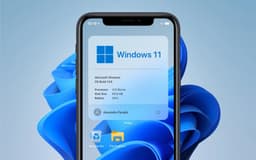
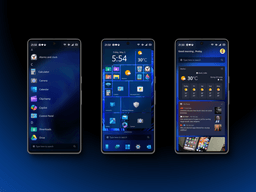
Never officially released, but the dream of Windows on a phone lives on — today's reality: Project Renegade, Lumia WOA, and NexPhone are making it happen. With Windows on Arm maturing and Android continuity finally arriving, the concept is reborn.

Overview
How It Works
1. Prerequisites & Supported Device
Choose a Qualcomm Snapdragon phone with an unlockable bootloader. Popular options include the Xiaomi Poco X3 Pro (Snapdragon 860), OnePlus 6/6T, and Lumia 950 XL (the original pioneer).
2. Unlock Bootloader & Install Custom UEFI
Unlock the bootloader (usually via `fastboot oem unlock`). Then flash Project Renegade's EDK2 UEFI firmware to the phone's boot partition. This replaces Android's bootloader with a generic UEFI environment capable of loading Windows.
3. Partition & Install Windows 11 ARM64
Repartition the internal storage to create a separate NTFS partition. Deploy a Windows 11 ARM64 image (the same one used for Windows on Arm laptops) to that partition using `DISM`. Inject community-developed drivers for the phone's specific hardware (touchscreen, cellular modem, GPS, audio).
4. Boot & Driver Troubleshooting
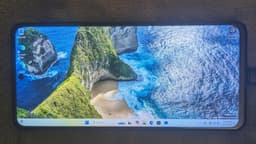
The phone now dual-boots: choose between Android or Windows 11 from the boot menu. First boot completes Windows OOBE. Many drivers now work, including Wi-Fi, 4G/LTE, Bluetooth, and even the camera on some devices.
Key Features
Full Windows 11 on a Phone
Not a mobile OS, but the full desktop Windows 11 (ARM64) running natively on phone hardware. Use File Explorer, Office, Edge, Visual Studio Code, and even AAA games like CS:GO on your phone's screen.
Dual-Boot with Android (Project Renegade)
Keep your day‑to‑day Android environment and boot into Windows 11 when you need a full desktop environment. Best of both worlds — your phone becomes a productivity power tool.
Cross-Device Resume (Microsoft Continuity)
Start an activity on your Android phone — editing a Word document, browsing a web page, listening to Spotify — and continue it instantly on your Windows 11 PC. This is the spiritual successor to Continuum[reference:19].
Windows on Arm Ecosystem
Windows 11 ARM64 emulates x86 and x64 apps, allowing you to run many traditional PC programs on your phone. Performance varies by chip, but modern Snapdragon devices (888, 860, 8cx Gen 3) handle many productivity apps gracefully.
External Monitor Support (Desktop Mode)
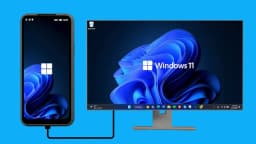
When you connect your Windows 11 phone to an external display (via USB‑C or Miracast), the familiar desktop interface appears — complete with taskbar, resizable windows, and Start Menu. This is the true revival of Continuum, now with a much more modern Windows 11 shell.
Windows Hello Biometric Sign‑in
On phones with compatible IR sensors (Surface Duo, Lumia 950), you can unlock Windows 11 using face recognition. A PIN provides a reliable fallback. Credentials are protected by TPM‑like security on the Snapdragon chip.
Microsoft Phone Link (Pre‑Installed)
If you install Windows 11 on an Android phone that also runs Android (dual‑boot), the Microsoft Phone Link app connects the two OS environments, allowing you to take calls and respond to messages from whichever OS you are currently using.
NexPhone: Triple-OS Phone (Commercial)
The first commercially available phone with official Windows 11 Arm support. Triple‑boot: Android 16, Debian Linux, and Windows 11. 12 GB RAM, 256 GB storage, 5,000 mAh battery, rugged design, and software support until 2036.
Project Renegade: The Heart of the DIY Windows Phone
A custom UEFI firmware that lets you boot Windows 11 on Snapdragon phones
What is Project Renegade?
Project Renegade is an open‑source project that provides a custom EDK2 UEFI firmware for a wide range of Qualcomm Snapdragon phones. It enables booting not only Windows 11 (ARM64) but also various Linux distributions alongside the original Android OS. The project was announced in 2024 and has seen rapid improvements in compatibility and functionality[reference:4].
Which Phones Are Supported?
Compatibility has grown considerably. Supported devices include: Nokia Lumia 950 and 950 XL, Microsoft Surface Duo and Duo 2, Xiaomi Poco X3 Pro, Google Pixel 2, LG models, OnePlus 6/6T, and many Xiaomi phones with Snapdragon 680, 720 and 855 chips. The project maintains a current list of supported devices and their hardware compatibility status[reference:5].
Installation Complexity
Installation is not for the faint of heart. The project provides step-by-step guides for downloading the Windows arm64 base image, extracting UEFI firmware and drivers, partitioning UFS storage, and performing installation and post-installation steps. Users report constant errors, blue screens on some configurations, and high device temperatures during operation[reference:6].
What Works and What Does Not
On a fully optimised device like the Xiaomi Poco X3 Pro with Snapdragon 860, users report that Windows 11 runs 'flawlessly' for basic tasks: web browsing, Office, Discord, and even older AAA games like CS:GO at up to 30fps. However, most other devices have incomplete drivers. Fingerprint sensors, speakers, cameras often do not work. 4G/LTE requires registry tweaking, and audio may work only through Bluetooth. Hyper‑V, Windows Subsystem for Linux (WSL2), and virtualisation features are non‑functional on most ports[reference:7].
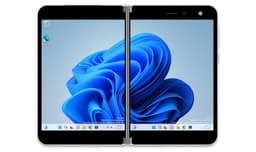
Surface Duo 1 & 2 Running Windows 11
Dual-screen Windows 11 — the project that keeps getting better
A Major Milestone for the First Surface Duo
Independent developer Gustave Monce — the same person who first ported Windows to the Lumia 950 XL — has made remarkable progress on the Surface Duo. As of 2025, the project now supports Wi‑Fi (2.5 GHz/5 GHz), cellular data (LTEA/LTE/HSDPA+/EDGE/GPRS), SMS text messaging, eSIM, GPS, and even Miracast for screen projection. Calls and VoLTE are expected in future releases. The device can now function as a usable Windows handheld[reference:8].
Surface Duo 2 — Early but Promising
Monce released the initial driver package (version 2211.16) for the Surface Duo 2. At this early stage, only one of the eight cores of the Snapdragon 888 processor is active, and many features do not work — including mobile phone connectivity (calls, data, SMS, LTE), GPS, touch, pen digitizer, Wi‑Fi, vibration motor, Bluetooth, cameras, and NFC. Project status: version 1 — not ready for daily use. The left display panel, temperature sensor, USB‑C, buttons, and charging do work[reference:9][reference:10].
The NexPhone: The First (Nearly) Commercial Windows Phone
Triple-boot: Android 16, Debian Linux, and Windows 11 Arm — all in your pocket
Hardware Specifications
The NexPhone is a rugged smartphone with a Qualcomm QCM6490 'extended-life' SoC (6nm process, comparable to Snapdragon 778G). It includes 12 GB of RAM, 256 GB of internal storage (expandable via microSD), a 6.58‑inch 1080×2403 120 Hz LCD, a 5,000 mAh battery, and long‑term support promised until 2036[reference:11].
Triple-OS Capability
The device ships with Android 16 but includes a custom dual‑boot or tri‑boot menu. Users can choose to boot Debian Linux or Windows 11 Arm natively on the phone — no emulation, no cloud streaming. When connected to an external monitor, Windows 11 switches to desktop mode, effectively turning the phone into a pocket PC[reference:12].
Price and Availability
The NexPhone is expected to launch in the third quarter of 2026. The retail price is expected to be around $549, with pre‑orders reported with a $199 deposit. This is the closest the world has come to a commercially available 'Windows 11 phone' since the discontinuation of the Lumia series[reference:13].

Continuum's Legacy: From Phone Docking to Cross-Device Resume
Seamlessly continue Android activities on your Windows 11 PC — the modern handoff
The Evolution
Windows 10 Mobile's Continuum — which let you dock a phone to use it like a PC — never made it to Windows 11 Mobile because there is no mobile OS. However, its legacy lives on in a new form. Microsoft has introduced Cross‑Device Resume (also called 'Continue from Phone') in Windows 11 Insider builds, starting with KB5070307 in late 2025[reference:14].
How Cross-Device Resume Works
The feature uses the 'Link to Windows' app (installed on Android phones) and Microsoft's Continuity SDK. When you open a compatible app on your phone, it sends an activity context packet (AppContext) to your paired Windows 11 PC. The Cross Device Experience Host service on your PC then opens the corresponding desktop app or browser page at the exact spot where you left off. It currently supports Microsoft 365 Copilot apps (online Word, Excel, PowerPoint), Spotify playback resumption, and supported web browsing[reference:15].
Supported Phones and Limitations
Initial supported Android brands include Samsung, Honor, Huawei, OPPO, and Vivo. Xiaomi, Motorola, and Google Pixel phones are not yet on the list. The feature requires Android phone manufacturers to deeply integrate Microsoft's Continuity SDK. It does not work with iOS devices. It is currently a limited‑access API, with developers needing to implement complex integration[reference:16].
Windows Hello for Mobile (Biometric Security)
Windows Hello on a phone? Yes — with the right cameras
Enabling Windows Hello
If you install Windows 11 on a phone that has a compatible IR camera (notably the Surface Duo and some high‑end Lumia models), the Windows Hello facial recognition feature works out of the box. You can unlock the phone with your face, just as on a Surface Pro tablet, and authenticate for Microsoft Wallet, apps, and web sign‑ins.
PIN Fallback
As on desktop Windows 11, a device PIN is always available. The combination of TPM‑like hardware security (present in most Qualcomm Snapdragon chips) and biometric unlock makes Windows 11 on a phone remarkably secure — potentially more so than many consumer Android phones that lack hardware security modules.

UWP (Universal Windows Platform) in Windows 11 Mobile
UWP was designed for mobile; Windows 11 on Arm still supports it
The UWP Promise
The Universal Windows Platform (UWP) was originally designed to run the same app package on Windows 10 PC, Windows 10 Mobile, Xbox, and HoloLens. When Windows 10 Mobile was discontinued, UWP effectively lost its mobile target. However, Windows 11 still fully supports UWP apps — and when you run Windows 11 on a phone, those apps scale down to a mobile form factor automatically. The goal of 'write once, run everywhere' is technically alive, even if the mobile distribution is no longer official[reference:17].
Appx and Appxbundle Packages
Windows 11 still manages and distributes .appx and .appxbundle packages for UWP apps via the Microsoft Store. The store automatically detects the device type (phone, tablet, PC) and serves the appropriate package. In a Windows 11 phone installation, you could theoretically install any UWP app that has a mobile layout defined — if the phone is compatible[reference:18].
Legacy & Practical Reality
The app gap remains the Achilles' heel. Even if UWP technically works, the vast majority of modern app developers have abandoned the Windows Store for mobile. You will not find Snapchat, TikTok, or most banking apps. However, many progressive web apps (PWAs) install as standalone apps on Windows 11 and can fill some gaps. The upcoming NexPhone and Project Renegade devices rely mostly on Android for day-to-day app use and treat Windows 11 as a desktop‑on‑the‑go environment.
Pros
- ✓Full desktop Windows 11 in your pocket – not a stripped‑down mobile OS
- ✓External monitor dock turns your phone into a PC – authentic Continuum 2.0
- ✓Runs x86 and x64 apps (via emulation) – run software never designed for a phone
- ✓Dual‑boot with Android – use your phone normally and boot into Windows when needed
- ✓Windows Hello biometric security works on compatible hardware
- ✓Cross‑Device Resume bridges Android and Windows 11 seamlessly
- ✓NexPhone is a genuine commercial offering with proper support (expected 2026)
- ✓Open‑source community progress is rapid – more devices are gaining full driver support
- ✓Windows on Arm is maturing – Microsoft and Qualcomm continue improving performance and compatibility
- ✓Microsoft 365 on a phone with full Office desktop suite (including advanced formatting)
Cons
- ✗Not an official Microsoft product – no OEM support, no warranties, no Windows Update assurance on community ports
- ✗Driver incompleteness – on most community ports, cameras, fingerprint sensors, and speakers often do not work
- ✗High device temperature – Windows 11 on a phone can reach 48°C or higher under load
- ✗Poor battery life compared to Android on the same hardware (full Windows 11 is not optimised for phone batteries)
- ✗No native phone dialer or SMS integration – Windows 11 lacks a built‑in cellular telephony stack for calls; some community projects have added it manually
- ✗Installation is extremely complex – not for casual users; high risk of bricking the device
- ✗App gap remains – no official Google Play Store, no Instagram, Snapchat, many banking apps, or mobile‑optimised social media
- ✗Windows Subsystem for Android (WSA) deprecated – Microsoft removed WSA in March 2025, so you cannot run Android apps inside Windows on your phone
- ✗Virtualisation features broken – Hyper‑V, WSL2 often do not work on phone ports
- ✗Miracast still buggy – external display support may be incomplete on many community builds
Use Cases
Hidden & Useful Shortcuts
Master Windows 10 with these time‑saving keyboard shortcuts
Open File Explorer on phone
Task View (virtual desktops on the phone's screen)
Lock the phone (Windows Hello unlocks instantly)
Quickly adjust Bluetooth and Wi-Fi settings for tethering
Project to an external monitor (Project / Continuum mode)
Open Game Bar (screenshots, clips — if the game runs on the phone)
Emoji panel — useful for messaging on the phone
Take a custom screenshot (Snip & Sketch) of the phone screen
Launch dictation — surprisingly useful on a small screen
Windows 11 touchpad gesture — show desktop (on supported touchscreens)
Technical Specifications
| Architecture | ARM64 (only) – x86 phones not supported |
| Processor | Qualcomm Snapdragon 845, 855, 860, 888, 8cx Gen 1/2/3, QCM6490 (recommended) |
| RAM | Minimum 6 GB; recommended 8 GB or 12 GB for smooth emulation |
| Storage | 128 GB minimum (Windows 11 requires 64 GB + space for Android partition) |
| Graphics | Adreno 600 series (driver-dependent) |
| Cellular | 4G/LTE supported on many projects (requires manual registry/script configuration); 5G support is rare |
| Connectivity | Wi‑Fi 5/6, Bluetooth 5.0/5.2, GPS (on Surface Duo and some Project Renegade ports), eSIM (Surface Duo) |
Windows 11 'Mobile' vs Windows 10 Mobile vs NexPhone vs Community Projects
| Feature | win11Mobile | win10Mobile | nexphone | community |
|---|---|---|---|---|
| Official Microsoft product | No | Yes (discontinued) | Yes (third‑party) | No |
| Full desktop Windows version | Yes (ARM64) | No (mobile only) | Yes (Windows 11 ARM) | Yes (Windows 10/11 ARM) |
| Continuum / Desktop mode | Yes (native Windows 11 desktop) | Yes (limited UWP only) | Yes (full Windows 11 desktop) | Yes (full Windows 11 desktop) |
| Dual‑boot with Android | No official | No | Yes (triple‑boot) | Yes (Project Renegade) |
| Out‑of‑box drivers | N/A | Complete | Full (shipped) | Partial (user‑ported) |
| App ecosystem (mobile) | UWP + x86/x64 emulation | UWP only (limited) | UWP + Android (dual OS) | UWP + Android (dual boot) |
| Cellular calls / SMS | No native | Yes | Via Android OS | Possible (driver-dependent) |
| Ease of installation | N/A | Pre‑installed | Pre‑installed | Expert only (high risk) |