
Windows 10 Mobile
The last Windows phone OS – unified ecosystem, Continuum for desktop, and enterprise security in your pocket (2015–2020)
Overview
How It Works
1. UEFI on ARM & Secure Boot
设备的 ARM 固件 (UEFI) 验证引导加载程序签名。安全启动可确保不会加载未经授权的操作系统。
2. OneCore Kernel & HAL
ARM 特定内核加载 Qualcomm Snapdragon SoC(无线电、传感器、摄像头、电池)的硬件抽象层 (HAL)。
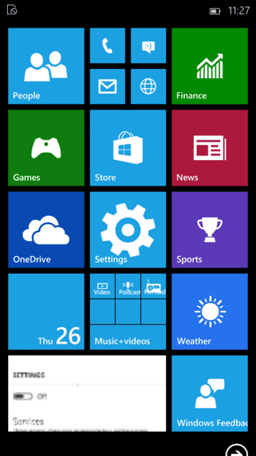
3. Adaptive Shell & Start Screen
手机外壳加载 - 带有活动磁贴的垂直滚动开始屏幕(而不是桌面开始菜单)。该界面针对触摸进行了优化。
4. Cellular & Telephony Stack
无线接口层 (RIL) 初始化 VoLTE、SMS 和数据连接。电话应用程序与 Skype(用于 VoIP)集成。
5. Continuum Mode (if docked)
当通过 Continuum Dock 连接到外部显示器时,操作系统会在显示器上启动桌面外壳,而手机屏幕则变成触控板或继续其自己的 UI。
6. Background Tasks & Battery Saver
应用程序使用后台任务(而非完整进程)来节省电量。操作系统会自动暂停不活动的 UWP 应用程序。
Key Features
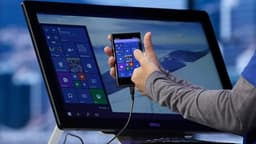
Continuum for Phone
将您的手机连接到显示器、鼠标和键盘 - 像台式电脑一样使用它。 UWP 应用程序调整大小并在大屏幕上的窗口中运行。
Universal Windows Platform (UWP)
相同的应用程序可以在手机、平板电脑、PC、Xbox 和 HoloLens 上运行,并为每个设备提供自适应 UI。
Windows Hello (Iris Scanner)
通过红外虹膜识别进行生物识别认证(Lumia 950 系列)。安全地解锁手机并授权付款。
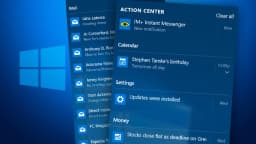
Action Centre
从顶部向下滑动可进行快速设置(Wi‑Fi、蓝牙、旋转锁定、亮度)和捆绑通知 - 与 Android/iOS 类似。
Microsoft Edge
Edge 的移动版本,具有阅读视图、收藏夹同步和密码管理器。与桌面 Edge 共享相同的渲染引擎。
Office Mobile (Universal)
预装了 Word、Excel 和 PowerPoint – 具有近乎完整的文档兼容性。 Continuum 使在显示器上编辑电子表格变得高效。
OneDrive Integration
自动相机胶卷备份、文件同步和跨设备访问。提供按需文件(云文件无需下载即可查看)。
BitLocker & Enterprise Security
全设备加密、MDM 注册、VPN、工作文件夹 – 手机上的企业级安全性。
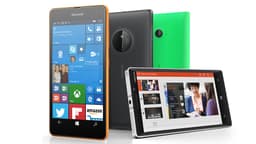
Live Tiles Start Screen
可定制的开始屏幕,带有显示通知的实时翻转图块 - Windows 手机的独特视觉标识。
Skype Integration
Skype 内置于电话应用程序中 – VoIP 通话和消息与传统的蜂窝短信/彩信合并。
Continuum for Phone: Your PC in Your Pocket
连接到显示器、键盘和鼠标 – 像使用台式机一样使用手机
How Continuum Works
Continuum 使用 Miracast(无线)或 USB-C / HDMI(有线)将 Windows 10 桌面界面投影到外部显示器上。手机本身成为触控板或继续独立运行手机应用程序。支持的 UWP 应用(Office、Edge、Store)可调整大小并像桌面应用一样运行。
Required Hardware
只有高端 Lumia 手机(950、950 XL、1520 和 HP Elite x3)支持通过 Microsoft Display Dock(HDMI、USB、以太网)的 Continuum。大多数中端设备缺乏视频输出功能。
App Limitations
只有针对 Continuum 优化的 UWP 应用才可以工作;传统的 Win32 应用程序 (exe) 无法运行。这严重限制了生产力软件的可用性。
Legacy & End of Life
在 Windows 10 Mobile 之后,微软放弃了 Continuum。这个概念后来演变为“你的手机”(手机屏幕镜像)和“链接到 Windows”(三星合作伙伴关系)。
Universal Windows Platform (UWP) Apps
一款适用于手机、平板电脑、PC、Xbox 和 HoloLens 的应用程序
Write Once, Run Everywhere
UWP 应用程序使用响应式设计 - 相同的代码适应屏幕尺寸、输入(触摸/鼠标/笔)和设备功能。开发人员可以通过一个应用程序包瞄准整个 Windows 生态系统。
App Store (Microsoft Store)
Windows 10 Mobile 访问与 PC 相同的 Microsoft Store。购买的应用程序可以跨设备运行。流行的应用程序包括 Facebook、Twitter、Netflix 和 Microsoft Office(Word、Excel、PowerPoint)。
The App Gap Problem
开发人员优先考虑 iOS 和 Android。许多主要应用程序(Snapchat、Google 应用程序、银行应用程序)从未针对 Windows 10 Mobile 发布,导致平台衰落。

Windows Hello (Iris Recognition)
在支持的 Lumia 手机上进行安全生物识别登录
Iris Scanner
Lumia 950 和 950 XL 配备红外虹膜扫描仪。它通过扫描用户眼睛中的独特图案来验证用户的身份——即使在黑暗中也是如此。安全性可与指纹传感器相媲美。
Integration with Wallet & Apps
Windows Hello 解锁手机、授权 Microsoft 钱包支付 (NFC) 并登录支持生物识别的 UWP 应用。

Enterprise & Security Features
智能手机上的 BitLocker、MDM、VPN 和安全启动
BitLocker Device Encryption
所有 Windows 10 移动设备均默认启用全设备加密(在 Qualcomm 芯片上使用类似 TPM 的安全性)。如果手机丢失或被盗,这可以保护公司数据。
Mobile Device Management (MDM)
组织可以通过 Microsoft Intune 或第三方 MDM(VMware AirWatch、MobileIron)管理 Windows 10 移动电话。策略强制执行 PIN 复杂性、越狱检测和应用程序白名单。
VPN & Work Folders
内置 VPN 客户端支持 IKEv2、L2TP/IPsec 和 SSTP。工作文件夹无需完整设备注册即可安全同步公司文件。
Secure Boot & Firmware Protection
防止未经授权的操作系统刷新 - 类似于 Android 的验证启动。

Cortana Integration
您手机的语音助手可与您的电脑同步
Deep System Integration
Cortana 可以发送短信、设置提醒、创建日历事件、搜索网络和控制音乐——所有这些都可以通过语音进行。它将提醒和通知与 Windows 10 PC 同步。
Missed Call & SMS Notifications on PC
借助 Cortana,您可以直接从 Windows 10 桌面接听电话或回复短信(通过“在电脑上继续”功能)。
Pros
- ✓流畅快速的界面 – 动态磁贴和流畅的动画,即使在中档硬件上也不会出现延迟
- ✓Continuum 将您的手机变成桌面 – 在当时是独一无二的
- ✓无臃肿软件 – 干净的 Microsoft 体验,无运营商皮肤
- ✓出色的安全性 – BitLocker、安全启动、每月更新(直到 2020 年)
- ✓与 Windows 10 PC 集成 – 通知、短信、照片通过 Cortana 和 OneDrive 自动同步
- ✓Office Mobile 确实有用且免费
- ✓Windows Hello 虹膜扫描 具有未来感且安全
- ✓电池寿命很好 - 后台任务管理得很好
- ✓UWP 应用程序 是沙盒的,比 Android 应用程序占用更少的资源
Cons
- ✗应用程序差距 – 没有 Google 应用程序(YouTube、Gmail、地图),没有 Snapchat,许多银行应用程序缺失
- ✗Continuum 受限 – 仅高端手机(Lumia 950/950 XL、HP Elite x3)支持; Win32应用程序无法运行
- ✗已停产 – 2019 年 12 月(或某些型号的 2020 年 1 月)之后没有安全更新
- ✗市场份额小 – 很少有开发人员构建 UWP 应用程序;到 2017 年,甚至微软也放弃了第一方应用程序
- ✗2020 年之后不再使用 WhatsApp – WhatsApp 于 2019 年 12 月终止支持
- ✗Cortana 已区域锁定(在许多国家/地区不可用)
- ✗没有 Google Play 服务 – 许多网站假定为 Android/iOS
- ✗硬件创新停滞 – 最后的旗舰是 Lumia 950 (2015);后来的设备都是低端的
- ✗Microsoft Store – 应用程序越来越少;很多都被开发商抛弃了
- ✗没有通知徽章 – 动态磁贴仅显示计数,但不展开详细预览
Use Cases
Hidden & Useful Shortcuts
Master Windows 10 with these time‑saving keyboard shortcuts
Open Action Centre (notifications + quick settings)
Open app list (alphabetical)
Open app switcher / task view
Launch Continuum (if docked)
Take a screenshot (saved to Screenshots folder)
Supported on Lumia devices – turn on screen without pressing power button
Open Settings (quick access)
Voice activate Cortana
Technical Specifications
| Architecture | ARM (32‑bit) – no 64‑bit support for phones |
| Processor | Qualcomm Snapdragon 200 series (low‑end) to 810 (Lumia 950) |
| RAM | Minimum 1 GB; recommended 2 GB for Continuum |
| Storage | 8 GB minimum; expandable via microSD (on most models) |
| Display | 4–6 inches, 720p to 1440p (WQHD) |
| Graphics | Adreno 3xx/4xx integrated |
| Cellular | 4G LTE (cat 4 to cat 6), VoLTE, eSIM (on some models) |
| Sensors | Accelerometer, gyroscope, proximity, ambient light, iris scanner (Lumia 950) |
| Connectivity | Wi‑Fi 802.11 a/b/g/n/ac, Bluetooth 4.1, NFC, GPS/GLONASS, USB‑C (950 series) or micro‑USB |
| Continuum | Requires Display Dock or Miracast adapter, supported only on Snapdragon 808/810 and above |
| Enterprise | BitLocker, MDM, VPN, S/MIME, certificate management |
Windows 10 Mobile vs iOS vs Android (2020 maturity)
| Feature | win10Mobile | iOS | android |
|---|---|---|---|
| App ecosystem | Very poor (app gap) | Excellent (2M+ apps) | Excellent (3M+ apps) |
| Desktop convergence | Continuum (phone → PC) | iPadOS + Sidecar (limited) | Samsung DeX, Motorola Ready For |
| Security updates | Monthly (ended 2020) | 6+ years | Varies (2–5 years) |
| Customisation | Live Tiles (unique) | Limited (no widgets until iOS 14) | Extensive (launchers, widgets) |
| Pre‑installed office | Word, Excel, PowerPoint (free) | Apple iWork (free) | Google Docs/Sheets (free) |
| Biometrics | Iris scanner (on some) | Face ID / Touch ID | Fingerprint / face unlock |
| Cloud integration | OneDrive, Outlook | iCloud, iMessage | Google Drive, Gmail |