
Windows 11 Mobile
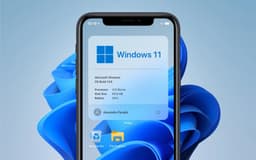
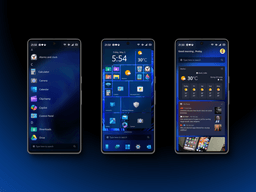
Never officially released, but the dream of Windows on a phone lives on — today's reality: Project Renegade, Lumia WOA, and NexPhone are making it happen. With Windows on Arm maturing and Android continuity finally arriving, the concept is reborn.

Overview
How It Works
1. Prerequisites & Supported Device
选择带有可解锁引导加载程序的 Qualcomm Snapdragon 手机。热门选择包括小米 Poco X3 Pro(Snapdragon 860)、OnePlus 6/6T 和 Lumia 950 XL(最初的先驱)。
2. Unlock Bootloader & Install Custom UEFI
解锁引导加载程序(通常通过“fastboot oem unlock”)。然后将 Project Renegade 的 EDK2 UEFI 固件刷新到手机的启动分区。这将 Android 的引导加载程序替换为能够加载 Windows 的通用 UEFI 环境。
3. Partition & Install Windows 11 ARM64
对内部存储重新分区以创建单独的 NTFS 分区。使用“DISM”将 Windows 11 ARM64 映像(与 Arm 笔记本电脑上的 Windows 使用的映像相同)部署到该分区。为手机的特定硬件(触摸屏、蜂窝调制解调器、GPS、音频)注入社区开发的驱动程序。
4. Boot & Driver Troubleshooting
该手机现在支持双启动:从启动菜单中选择 Android 或 Windows 11。首次启动完成 Windows OOBE。许多驱动程序现在都可以使用,包括 Wi-Fi、4G/LTE、蓝牙,甚至某些设备上的摄像头。
Key Features
Full Windows 11 on a Phone
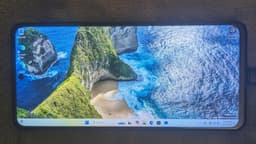
不是移动操作系统,而是在手机硬件上本机运行的完整桌面 Windows 11 (ARM64)。在手机屏幕上使用文件资源管理器、Office、Edge、Visual Studio Code,甚至 AAA 游戏(如 CS:GO)。
Dual-Boot with Android (Project Renegade)
保留日常 Android 环境,并在需要完整桌面环境时启动至 Windows 11。两全其美——您的手机成为生产力工具。
Cross-Device Resume (Microsoft Continuity)
在 Android 手机上开始一项活动 - 编辑 Word 文档、浏览网页、收听 Spotify - 并立即在 Windows 11 PC 上继续执行。这是 Continuum 的精神继承者[参考文献:19]。
Windows on Arm Ecosystem
Windows 11 ARM64 模拟 x86 和 x64 应用程序,允许您在手机上运行许多传统的 PC 程序。性能因芯片而异,但现代 Snapdragon 设备(888、860、8cx Gen 3)可以轻松处理许多生产力应用程序。
External Monitor Support (Desktop Mode)
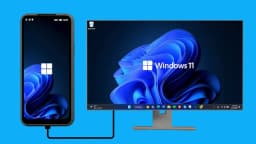
当您将 Windows 11 手机连接到外部显示器(通过 USB-C 或 Miracast)时,会出现熟悉的桌面界面 - 包括任务栏、可调整大小的窗口和“开始”菜单。这是 Continuum 的真正复兴,现在拥有更现代的 Windows 11 shell。
Windows Hello Biometric Sign‑in
在配备兼容红外传感器的手机(Surface Duo、Lumia 950)上,您可以使用人脸识别解锁 Windows 11。 PIN 可提供可靠的后备方案。凭证受到 Snapdragon 芯片上类似 TPM 的安全保护。
Microsoft Phone Link (Pre‑Installed)
如果您在也运行 Android(双启动)的 Android 手机上安装 Windows 11,则 Microsoft Phone Link 应用会连接两个操作系统环境,使您可以从当前使用的任何操作系统接听电话并回复消息。
NexPhone: Triple-OS Phone (Commercial)
第一款具有官方 Windows 11 Arm 支持的商用手机。三重启动:Android 16、Debian Linux 和 Windows 11。12 GB RAM、256 GB 存储、5,000 mAh 电池、坚固耐用的设计和软件支持直至 2036 年。
Project Renegade: The Heart of the DIY Windows Phone
自定义 UEFI 固件,可让您在 Snapdragon 手机上启动 Windows 11
What is Project Renegade?
Project Renegade 是一个开源项目,为各种 Qualcomm Snapdragon 手机提供定制 EDK2 UEFI 固件。它不仅可以启动 Windows 11 (ARM64),还可以启动各种 Linux 发行版以及原始 Android 操作系统。该项目于 2024 年宣布,在兼容性和功能方面得到了快速改进[参考:4]。
Which Phones Are Supported?
兼容性显着增强。支持的设备包括:诺基亚 Lumia 950 和 950 XL、微软 Surface Duo 和 Duo 2、小米 Poco X3 Pro、Google Pixel 2、LG 机型、OnePlus 6/6T 以及许多配备 Snapdragon 680、720 和 855 芯片的小米手机。该项目维护当前支持的设备列表及其硬件兼容性状态[参考:5]。
Installation Complexity
安装不适合胆小的人。该项目提供了下载 Windows arm64 基础映像、提取 UEFI 固件和驱动程序、对 UFS 存储分区以及执行安装和安装后步骤的分步指南。用户报告不断出现错误、某些配置上的蓝屏以及运行期间设备温度较高[参考:6]。
What Works and What Does Not
在配备 Snapdragon 860 的小米 Poco X3 Pro 等经过全面优化的设备上,用户报告 Windows 11 可以“完美地”执行基本任务:网页浏览、Office、Discord,甚至是 CS:GO 等较旧的 AAA 游戏,速度高达 30 fps。但是,大多数其他设备的驱动程序不完整。指纹传感器、扬声器、摄像头经常无法工作。 4G/LTE 需要注册表调整,并且音频只能通过蓝牙工作。 Hyper-V、适用于 Linux 的 Windows 子系统 (WSL2) 和虚拟化功能在大多数端口上不起作用[参考:7]。
Surface Duo 1 & 2 Running Windows 11
双屏 Windows 11 — 不断进步的项目
A Major Milestone for the First Surface Duo
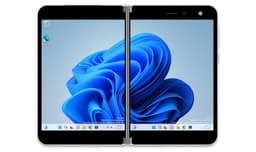
独立开发者 Gustave Monce(第一个将 Windows 移植到 Lumia 950 XL 的人)在 Surface Duo 上取得了显着的进步。截至 2025 年,该项目现已支持 Wi‑Fi (2.5 GHz/5 GHz)、蜂窝数据 (LTEA/LTE/HSDPA+/EDGE/GPRS)、短信、eSIM、GPS,甚至用于屏幕投影的 Miracast。未来版本预计将提供通话和 VoLTE 功能。该设备现在可以用作可用的 Windows 手持设备[参考:8]。
Surface Duo 2 — Early but Promising
Monce 发布了 Surface Duo 2 的初始驱动程序包(版本 2211.16)。在早期阶段,Snapdragon 888 处理器的八个核心中只有一个处于活动状态,许多功能无法使用,包括手机连接(通话、数据、短信、LTE)、GPS、触摸、笔式数字化仪、Wi-Fi、振动电机、蓝牙、相机和 NFC。项目状态:版本 1 — 尚未准备好供日常使用。左侧显示面板、温度传感器、USB-C、按钮和充电功能正常工作[参考:9][参考:10]。
The NexPhone: The First (Nearly) Commercial Windows Phone
三重启动:Android 16、Debian Linux 和 Windows 11 Arm — 尽在您的口袋中
Hardware Specifications
NexPhone 是一款坚固耐用的智能手机,配备 Qualcomm QCM6490“长寿命”SoC(6nm 工艺,与 Snapdragon 778G 相当)。它包括 12 GB RAM、256 GB 内部存储(可通过 microSD 扩展)、6.58 英寸 1080×2403 120 Hz LCD、5,000 mAh 电池以及承诺到 2036 年的长期支持[参考:11]。
Triple-OS Capability
该设备预装 Android 16,但包含自定义双启动或三启动菜单。用户可以选择在手机上本地启动 Debian Linux 或 Windows 11 Arm——无需模拟,无需云流。当连接到外部显示器时,Windows 11 会切换到桌面模式,从而有效地将手机变成袖珍 PC[参考:12]。
Price and Availability
NexPhone 预计将于 2026 年第三季度推出。零售价预计约为 549 美元,预订需支付 199 美元定金。这是自 Lumia 系列停产以来,世界上最接近商用的“Windows 11 手机”[参考:13]。

Continuum's Legacy: From Phone Docking to Cross-Device Resume
在 Windows 11 PC 上无缝地继续 Android 活动 — 现代切换
The Evolution
Windows 10 Mobile 的 Continuum(让你可以将手机连接起来,像 PC 一样使用它)从未出现在 Windows 11 Mobile 上,因为没有移动操作系统。然而,它的遗产以新的形式继续存在。 Microsoft 在 Windows 11 Insider 版本中引入了跨设备恢复(也称为“从手机继续”),从 2025 年末的 KB5070307 开始[参考:14]。
How Cross-Device Resume Works
该功能使用“Link to Windows”应用程序(安装在 Android 手机上)和 Microsoft 的 Continuity SDK。当您在手机上打开兼容应用程序时,它会将活动上下文数据包 (AppContext) 发送到配对的 Windows 11 电脑。然后,您 PC 上的跨设备体验主机服务会在您离开的确切位置打开相应的桌面应用程序或浏览器页面。目前它支持 Microsoft 365 Copilot 应用程序(在线 Word、Excel、PowerPoint)、Spotify 播放恢复以及支持的网页浏览[参考:15]。
Supported Phones and Limitations
最初支持的 Android 品牌包括三星、荣耀、华为、OPPO 和 Vivo。小米、摩托罗拉和谷歌 Pixel 手机尚未上榜。该功能需要Android手机制造商深度集成微软的Continuity SDK。它不适用于 iOS 设备。目前它是一个访问受限的 API,开发人员需要实现复杂的集成[参考:16]。
Windows Hello for Mobile (Biometric Security)
手机上的 Windows Hello?是的——使用合适的相机
Enabling Windows Hello
如果您在具有兼容红外摄像头的手机(特别是 Surface Duo 和一些高端 Lumia 型号)上安装 Windows 11,则 Windows Hello 面部识别功能可以立即使用。您可以使用脸部解锁手机,就像在 Surface Pro 平板电脑上一样,并对 Microsoft 钱包、应用程序和 Web 登录进行身份验证。
PIN Fallback
与桌面 Windows 11 一样,设备 PIN 码始终可用。类似 TPM 的硬件安全性(存在于大多数高通 Snapdragon 芯片中)和生物识别解锁的结合使手机上的 Windows 11 非常安全,可能比许多缺乏硬件安全模块的消费类 Android 手机更安全。

UWP (Universal Windows Platform) in Windows 11 Mobile
UWP 专为移动设备设计; Arm 上的 Windows 11 仍然支持它
The UWP Promise
通用 Windows 平台 (UWP) 最初设计为在 Windows 10 PC、Windows 10 Mobile、Xbox 和 HoloLens 上运行相同的应用程序包。当 Windows 10 Mobile 停产时,UWP 实际上失去了其移动目标。但是,Windows 11 仍然完全支持 UWP 应用程序 - 当您在手机上运行 Windows 11 时,这些应用程序会自动缩小为移动设备尺寸。即使移动发行版不再是官方的,“一次编写,到处运行”的目标在技术上仍然存在[参考:17]。
Appx and Appxbundle Packages
Windows 11 仍通过 Microsoft Store 管理和分发 UWP 应用程序的 .appx 和 .appxbundle 包。商店会自动检测设备类型(手机、平板电脑、PC)并提供适当的套餐。在 Windows 11 手机安装中,理论上您可以安装任何定义了移动布局的 UWP 应用 - 如果手机兼容的话[参考:18]。
Legacy & Practical Reality
应用程序的差距仍然是其致命弱点。即使 UWP 在技术上可行,绝大多数现代应用程序开发人员也已经放弃了 Windows 移动应用商店。您找不到 Snapchat、TikTok 或大多数银行应用程序。然而,许多渐进式网络应用程序 (PWA) 在 Windows 11 上作为独立应用程序安装,可以填补一些空白。即将推出的 NexPhone 和 Project Renegade 设备主要依赖 Android 进行日常应用程序使用,并将 Windows 11 视为移动桌面环境。
Pros
- ✓口袋里的完整桌面 Windows 11 – 不是精简的移动操作系统
- ✓外接显示器底座将您的手机变成 PC – 正宗的 Continuum 2.0
- ✓运行 x86 和 x64 应用程序(通过仿真) – 运行从未为手机设计的软件
- ✓与 Android 双重启动 – 正常使用手机并在需要时启动至 Windows
- ✓Windows Hello 生物识别安全适用于兼容的硬件
- ✓跨设备恢复无缝连接 Android 和 Windows 11
- ✓NexPhone 是真正的商业产品,具有适当的支持(预计 2026 年)
- ✓开源社区进展迅速 - 更多设备正在获得全面的驱动程序支持
- ✓Windows on Arm 日趋成熟 – 微软和高通继续提高性能和兼容性
- ✓手机上的 Microsoft 365 具有完整的 Office 桌面套件(包括高级格式设置)
Cons
- ✗不是 Microsoft 官方产品 – 没有 OEM 支持、没有保修、社区端口上没有 Windows 更新保证
- ✗驱动程序不完整 – 在大多数社区端口上,摄像头、指纹传感器和扬声器通常无法工作
- ✗设备温度高 – 手机上的 Windows 11 在负载下可能达到 48°C 或更高
- ✗与相同硬件上的 Android 相比,电池寿命较差(完整的 Windows 11 未针对手机电池进行优化)
- ✗没有本机电话拨号器或 SMS 集成 – Windows 11 缺乏用于呼叫的内置蜂窝电话堆栈;一些社区项目已经手动添加了
- ✗安装极其复杂 – 不适合临时用户;设备变砖的风险很高
- ✗应用程序差距仍然存在 – 没有官方 Google Play 商店,没有 Instagram、Snapchat、许多银行应用程序或针对移动设备优化的社交媒体
- ✗Windows Subsystem for Android (WSA) 已弃用 – Microsoft 于 2025 年 3 月删除了 WSA,因此您无法在手机上的 Windows 内运行 Android 应用程序
- ✗虚拟化功能损坏 – Hyper-V、WSL2 通常无法在手机端口上运行
- ✗Miracast 仍然有问题 – 在许多社区版本中外部显示器支持可能不完整
Use Cases
Hidden & Useful Shortcuts
Master Windows 10 with these time‑saving keyboard shortcuts
Open File Explorer on phone
Task View (virtual desktops on the phone's screen)
Lock the phone (Windows Hello unlocks instantly)
Quickly adjust Bluetooth and Wi-Fi settings for tethering
Project to an external monitor (Project / Continuum mode)
Open Game Bar (screenshots, clips — if the game runs on the phone)
Emoji panel — useful for messaging on the phone
Take a custom screenshot (Snip & Sketch) of the phone screen
Launch dictation — surprisingly useful on a small screen
Windows 11 touchpad gesture — show desktop (on supported touchscreens)
Technical Specifications
| Architecture | ARM64 (only) – x86 phones not supported |
| Processor | Qualcomm Snapdragon 845, 855, 860, 888, 8cx Gen 1/2/3, QCM6490 (recommended) |
| RAM | Minimum 6 GB; recommended 8 GB or 12 GB for smooth emulation |
| Storage | 128 GB minimum (Windows 11 requires 64 GB + space for Android partition) |
| Graphics | Adreno 600 series (driver-dependent) |
| Cellular | 4G/LTE supported on many projects (requires manual registry/script configuration); 5G support is rare |
| Connectivity | Wi‑Fi 5/6, Bluetooth 5.0/5.2, GPS (on Surface Duo and some Project Renegade ports), eSIM (Surface Duo) |
Windows 11 'Mobile' vs Windows 10 Mobile vs NexPhone vs Community Projects
| Feature | win11Mobile | win10Mobile | nexphone | community |
|---|---|---|---|---|
| Official Microsoft product | No | Yes (discontinued) | Yes (third‑party) | No |
| Full desktop Windows version | Yes (ARM64) | No (mobile only) | Yes (Windows 11 ARM) | Yes (Windows 10/11 ARM) |
| Continuum / Desktop mode | Yes (native Windows 11 desktop) | Yes (limited UWP only) | Yes (full Windows 11 desktop) | Yes (full Windows 11 desktop) |
| Dual‑boot with Android | No official | No | Yes (triple‑boot) | Yes (Project Renegade) |
| Out‑of‑box drivers | N/A | Complete | Full (shipped) | Partial (user‑ported) |
| App ecosystem (mobile) | UWP + x86/x64 emulation | UWP only (limited) | UWP + Android (dual OS) | UWP + Android (dual boot) |
| Cellular calls / SMS | No native | Yes | Via Android OS | Possible (driver-dependent) |
| Ease of installation | N/A | Pre‑installed | Pre‑installed | Expert only (high risk) |