

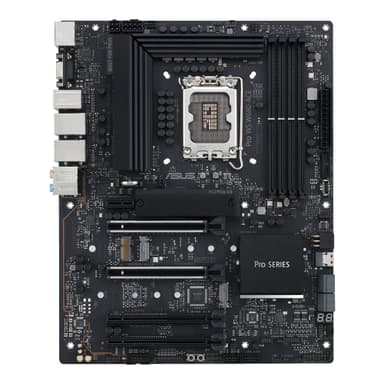
ASUS Pro WS W680-ACE
Enterprise-Grade Reliability Meets Next-Gen Intel Workstation Performance
Overview
How It Works
ECC Memory Verification
Utilizes the Intel W680 chipset memory controller to run ECC (Error-Correcting Code) DDR5 memory, detecting and correcting single-bit data corruption in real-time to prevent OS crashes during critical computations.
Power Delivery Management
Regulates voltage to the CPU using a high-durability 12+1 power stages VRM design, maintaining steady current delivery under prolonged 24/7 rendering or compilation workloads.
High-Bandwidth Storage Routing
Directs data pathways from PCIe 4.0 M.2 SSDs and enterprise SlimSAS devices directly through the chipset and CPU lanes for low-latency, high-throughput storage arrays.
Remote Administration Loop
Works with the onboard ASUS Control Center Express utility to communicate with remote IT management consoles, facilitating hardware monitoring, software dispatching, and remote BIOS updates.
Key Features
ECC DDR5 Support
Supports Error-Correcting Code memory to prevent data corruption and system crashes under heavy mathematical or scientific computations.
Dual Intel 2.5 Gb Ethernet
Equipped with twin Intel 2.5Gb LAN ports, enabling link aggregation, network redundancy, and high-speed NAS interfacing.
PCIe 5.0 Ready
Provides full PCIe 5.0 x16 bandwidth for next-generation professional GPUs and high-speed machine learning accelerator cards.
SlimSAS Connector
Includes a built-in SlimSAS slot supporting PCIe 4.0 x4 or four SATA drives, crucial for enterprise storage setups.
ASUS Control Center Express
An integrated IT monitoring and management software utility designed for remote deployment, security enforcement, and hardware health tracking.
12+1 DrMOS Power Stages
Premium VRM configuration ensuring stable power delivery to high-core-count Intel processors under sustained execution.
Triple PCIe 4.0 M.2 Slots
Three onboard M.2 slots equipped with dedicated heatsinks to prevent thermal throttling on high-speed NVMe drives.
ProCool II Power Connectors
Reinforced 8-pin power connectors ensure a tight and reliable connection to the PSU, lowering impedance and thermal generation.
SafeSlot & SafeDIMM
Metal-reinforced PCIe and memory slots protect physical components against shearing and bending during component installation.
Enterprise-Class Power Delivery & VRM Design
Sustaining Heavy Compute Workloads 24/7
12+1 Power Stages
Configured with high-quality DrMOS modules rated for high current capacity to handle top-tier Core i9 CPUs.
ProCool II Connectors
Dual 8-pin inputs with solid pins to ensure lower impedance and prevent hotspot failures at the EPS connection.
Chokes and Capacitors
Premium alloy chokes and highly durable solid capacitors rated for up to 5,000 hours of continuous operation at extreme temperatures.
Massive VRM Heatsinks
Extruded aluminum heatsinks covering the MOSFETs and chokes, utilizing high-conductivity thermal pads for swift heat rejection.
Professional Memory & Storage Flexibility
ECC Safeguards and Enterprise SlimSAS Connectivity
DDR5 ECC Support
Allows standard Intel Core CPUs to run Unbuffered ECC RAM, correcting single-bit errors and reporting double-bit issues to prevent data corruption.
SlimSAS Port
Offers professional-grade storage connectivity, routing PCIe 4.0 x4 for high-speed SAS/SATA/NVMe backplanes.
Triple PCIe 4.0 M.2
Three dedicated onboard M.2 22110/2280 slots with double-sided heatsinks to keep drive temps low and performance high.
SATA Expansion
Four SATA 6 Gb/s ports supporting RAID 0, 1, 5, and 10 configurations for legacy storage arrays.
Next-Generation PCIe 5.0 and Expansion
Massive Bandwidth for GPUs and Accelerator Cards
Dual PCIe 5.0 SafeSlots
Supports running a single GPU at Gen 5 x16, or splitting the bandwidth to dual Gen 5 x8/x8 slots for multi-GPU setups.
PCIe 3.0 Expansion
Features two additional full-length PCIe 3.0 slots wired at x4 from the W680 chipset for capture cards or extra storage controllers.
SafeSlot Protection
Metal structural reinforcement around the primary PCIe slots to prevent PCB sag or slot tearing from heavy workstation GPUs.
Q-Release Button
A physical release mechanism on the primary PCIe slot to make swapping large professional GPUs painless.
Robust Out-of-Band Management & Connectivity
Server-Like Administration for Enterprise Environments
ASUS Control Center Express
Centralized IT management software providing real-time hardware monitoring, software updates, and USB port locking.
Dual Intel 2.5G LAN
Two premium Intel I225-LM/I226-LM controllers providing reliable high-bandwidth network connectivity and Teaming support.
BMC Header
A dedicated onboard header enabling compatibility with an optional ASMB11-iKVM card for IPMI-level out-of-band management.
USB 3.2 Gen 2x2 Type-C
A rear-panel high-speed USB-C port providing up to 20Gbps bandwidth for external storage or high-speed hardware keys.
Optimized Cooling and Thermal Controls
Silent and Intelligent System Regulation
Multiple PWM/DC Fan Headers
Features dedicated headers for CPU coolers, AIO liquid cooling pumps, and up to five system chassis fans.
ASUS Fan Xpert 4
Comprehensive software and BIOS control suite for setting customized, load-responsive fan curves.
Chassis Intrusion Detection
Dedicated header for security switches to alert administrators if the PC case is physically opened.
M.2 Backplate Cooling
Includes structural backplates on selected M.2 slots to dissipate heat from the underside of dual-sided high-speed NVMe drives.
✓ Pros
- ✓Supports Unbuffered ECC DDR5 memory, vital for professional-grade data integrity.
- ✓Dual Intel 2.5 Gb Ethernet ports support failover, load balancing, and network segmentation.
- ✓Onboard SlimSAS port allows direct connection to enterprise U.2/U.3 storage cages.
- ✓Dual PCIe 5.0 x16 slots support multi-GPU or accelerator configurations in x8/x8 mode.
- ✓Includes ASUS Control Center Express for hardware-level remote management and monitoring.
- ✓Solid 12+1 power stage VRM maintains stable performance under heavy sustained workloads.
- ✓Clever physical features like the Q-Release button make changing expansion cards simple.
- ✓Generous onboard M.2 cooling heatsinks preserve SSD health and prevent thermal throttling.
✗ Cons
- ✗No onboard Wi-Fi module included out of the box (requires manual expansion card).
- ✗Lacks a built-in AST2600 BMC chip (requires optional ASMB11-iKVM card for true IPMI, unlike the IPMI variant).
- ✗W680 chipset motherboards carry a significant price premium over standard Z690/Z790 consumer boards.
- ✗Unbuffered ECC DDR5 memory modules are harder to source and more expensive than standard DDR5.
- ✗No onboard RGB elements, which may disappoint those looking for workstation-meets-creator aesthetics.
Use Cases
Technical Specifications
Workstation Motherboard Comparison
| Feature | proWsW680Ace | industrialImbX1711 | mw34Sp0 |
|---|---|---|---|
| Chipset | Intel W680 | Intel W680 | Intel W680 |
| ECC DDR5 Support | Yes (Unbuffered) | Yes (Unbuffered) | Yes (Unbuffered) |
| PCIe 5.0 Support | 2 x PCIe 5.0 x16 slots | 1 x PCIe 5.0 x16 slot | 1 x PCIe 5.0 x16 slot |
| Networking Ports | 2 x Intel 2.5 GbE | 2 x Intel 1 GbE + 1 x 2.5 GbE | 2 x Intel 10 GbE |
| Storage Ports | 3 x M.2 PCIe 4.0, 1 x SlimSAS, 4 x SATA | 1 x M.2, 4 x SATA | 3 x M.2 PCIe 4.0, 1 x SlimSAS, 8 x SATA |
| Remote Management | ASUS Control Center Express (BMC Header) | No software included | Onboard AST2600 BMC (IPMI 2.0) |
| Audio Codec | Realtek S1220A (7.1 Channel) | Realtek ALC897 (Basic) | Realtek ALC897 (Basic) |
Setup Tips
Update the BIOS First
If you plan to use a 13th or 14th Gen Intel Core processor, download the latest BIOS from ASUS and use the BIOS FlashBack feature before installing the CPU to ensure boot compatibility.
Check Memory Orientation for Dual-Channel ECC
Ensure your ECC DDR5 modules are populated in slots A2 and B2 first (second and fourth slots from the CPU) to guarantee maximum stability and correct dual-channel activation.
Configure SlimSAS Mode in BIOS
Go to the BIOS advanced settings to configure the SlimSAS connector's operating mode depending on whether you are connecting an NVMe SSD or SATA hard drive array.
Enable Intel AMT / vPro
If you want to utilize the remote management capabilities of the Intel W680 platform, configure the Intel AMT settings in the BIOS during the initial setup.
Frequently Asked Questions
Key Takeaway
The ASUS Pro WS W680-ACE is a premium workstation motherboard designed to bring server-grade data security and rugged durability to Intel 12th, 13th, and 14th Gen Core processors. Featuring support for error-correcting ECC DDR5 memory, high-bandwidth PCIe 5.0 expansion, and an enterprise SlimSAS storage interface, this board is built for round-the-clock professional workloads. Dual 2.5 Gb Ethernet ports and robust out-of-band management options make it an exceptional foundation for deep learning, rendering, and high-performance engineering systems.