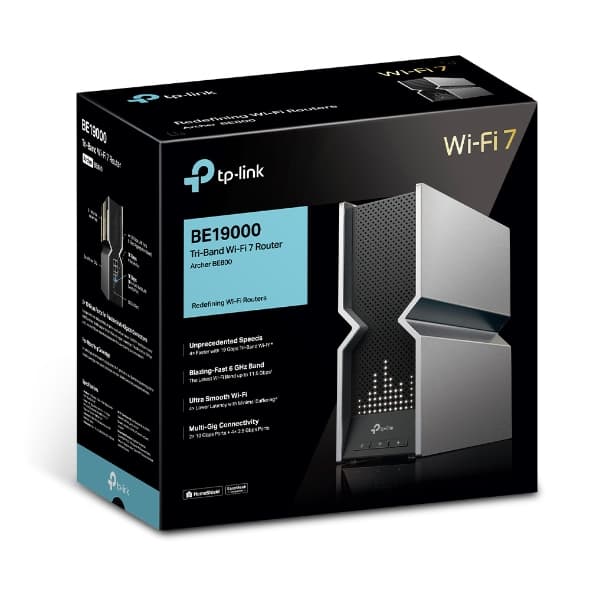

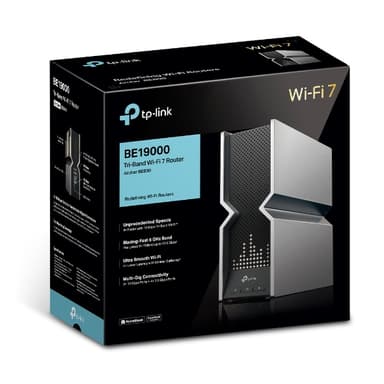
TP‑Link Archer BE800 Wi‑Fi 7 Tri‑Band Router
Blazing 19 Gbps speeds, dual 10G ports, and cutting‑edge Wi‑Fi 7 for the ultimate smart home
Key Highlights
- Wi‑Fi 7 tri‑band with 19 Gbps combined throughput
- Dual 10 Gbps Ethernet ports – ideal for multi‑gig internet and NAS
- Multi‑Link Operation (MLO) for lower latency and higher speed
- HomeShield security suite included at no extra cost
- EasyMesh support for seamless whole‑home Wi‑Fi coverage
Overview
How It Works
The Archer BE800 leverages the latest Wi‑Fi 7 innovations to deliver wired‑like speed and reliability over the air. Here’s how the key technologies work together:
Multi‑Link Operation (MLO)
MLO bonds two or three bands into a single virtual link. Your device can send and receive data on multiple frequencies simultaneously, increasing speed and providing a seamless failover if one band becomes congested.
320 MHz Channels
The 6 GHz band supports ultra‑wide 320 MHz channels, double the maximum of Wi‑Fi 6. This allows for a single stream of up to 5.8 Gbps, perfect for uncompressed 8K video or VR streaming.
4K‑QAM Modulation
Quadrature Amplitude Modulation (QAM) encodes data into radio waves. 4K‑QAM carries 12 bits per symbol instead of 10 bits (1K‑QAM), boosting peak data rates by 20% at close range.
Multi‑RU Puncturing
In Wi‑Fi 6, if a 20 MHz segment of an 80 MHz channel was busy, the entire channel was blocked. Multi‑RU Puncturing allows the router to use the remaining 60 MHz, so your speed doesn’t drop because of a neighbour’s interference.
Dual 10G Ethernet & Wired Backhaul
Two 10 Gbps ports provide massive wired bandwidth for a multi‑gig internet connection and a high‑speed NAS. The 2.5 Gbps LAN ports ensure even wired clients get top performance.
HomeShield Security & EasyMesh
HomeShield provides network‑level antivirus, intrusion prevention, and parental controls. EasyMesh lets you add compatible TP‑Link extenders to create a mesh network with a single SSID.
Key Features
Wi‑Fi 7 Tri‑Band (19 Gbps)
Combined throughput of 19 Gbps across 6 GHz, 5 GHz, and 2.4 GHz bands. Backward compatible with Wi‑Fi 6E, Wi‑Fi 6, and older standards.
Dual 10 Gbps Ethernet Ports
One 10G WAN for multi‑gig internet, one 10G LAN for a NAS or gaming PC. Four additional 2.5 Gbps LAN ports connect your wired devices at full speed.
Multi‑Link Operation (MLO)
Combines multiple bands into a single connection, reducing latency and increasing throughput for compatible Wi‑Fi 7 devices.
EasyMesh & Whole‑Home Coverage
Build a mesh network with compatible TP‑Link extenders. All nodes share a single network name, and your devices roam seamlessly.
HomeShield Security Suite
Built‑in network protection with real‑time IoT security, malicious site blocking, intrusion prevention, and parental controls. No subscription required.
Distinctive LED Matrix Design
The X‑shaped chassis with a customisable LED matrix displays network status, weather, or even emoji – a true centrepiece for any gaming or tech setup.
✓ Pros
- ✓Blazing Wi‑Fi 7 speeds – fully future‑proof
- ✓Dual 10G ports provide wired backbone for the fastest devices
- ✓MLO dramatically reduces latency for gaming and video calls
- ✓HomeShield security is included at no extra cost
- ✓EasyMesh support for seamless whole‑home coverage
- ✓Eye‑catching design with customisable LED matrix
- ✓Backward compatible with all existing Wi‑Fi devices
✗ Cons
- ✗Very expensive – priced at the top of the consumer market
- ✗Large physical footprint – requires ample desk or shelf space
- ✗Wi‑Fi 7 devices are still scarce (as of early 2024), so full speed is limited to new hardware
- ✗Some advanced features require the TP‑Link Tether app
- ✗No ADSL/VDSL modem built in – requires a separate modem for DSL connections
Use Cases
Technical Specifications
TP‑Link Archer BE800 vs ASUS GT‑BE98 vs Netgear Nighthawk RS700S
| Feature | tpLinkBE800 | asusGTBE98 | netgearRS700S | |
|---|---|---|---|---|
| Wi‑Fi Standard | Wi‑Fi 7 | Wi‑Fi 7 | Wi‑Fi 7 | |
| Max Speed | 19 Gbps | 25 Gbps | 19 Gbps | |
| 10G Ports | 2 (WAN + LAN) | 2 (WAN + LAN) | 1 (LAN/WAN) | |
| 2.5G LAN Ports | 4 | 4 | 1 | |
| Mesh Support | EasyMesh | AiMesh | Orbi Mesh | |
| Security Suite | HomeShield (free) | AiProtection Pro (free) | Armor (subscription) |
Setup Tips
Place the Router Centrally
For the best wireless coverage, place the Archer BE800 in a central, elevated location away from metal objects, thick walls, and microwaves. The 6 GHz band has shorter range, so central placement helps.
Use the 10G Port for Your NAS
Connect a 10G‑capable NAS to the 10G LAN port for lightning‑fast file transfers. This is ideal for video editors who work with large files stored on a network drive.
Enable MLO for Gaming
If you have a Wi‑Fi 7 gaming laptop or motherboard, enable MLO in the router settings. It will combine bands for the lowest possible ping and highest throughput.
Update Firmware Regularly
TP‑Link frequently updates firmware to improve performance and security. Enable automatic updates via the Tether app or check manually every few months.