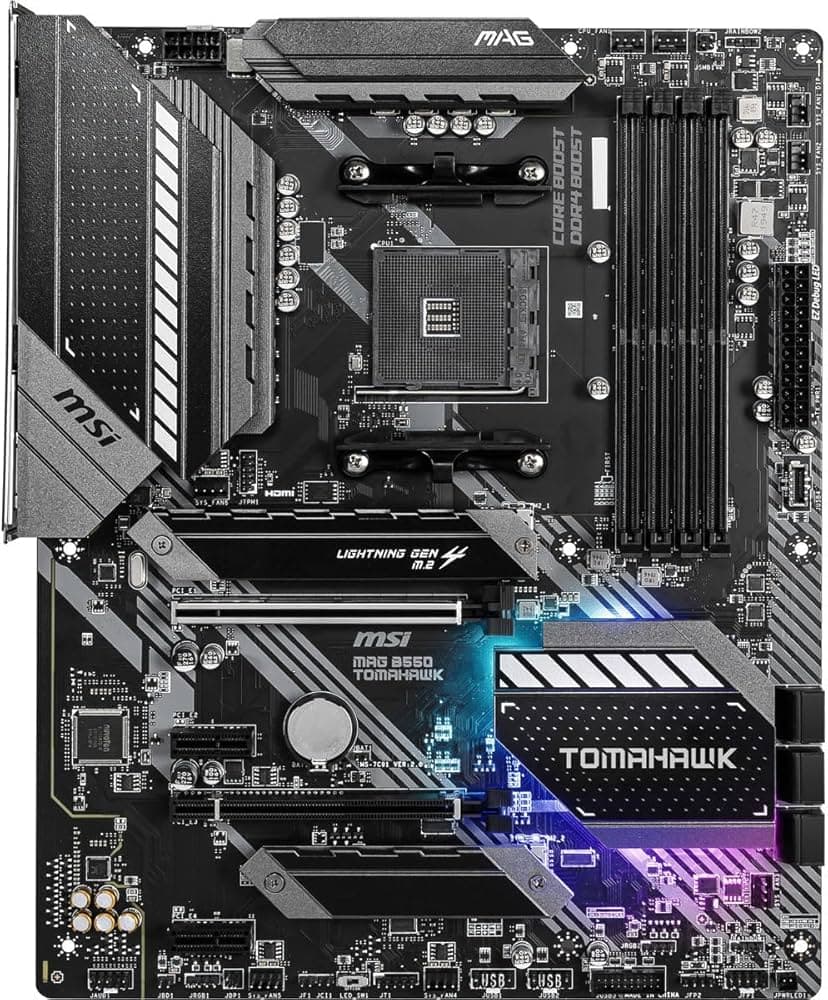
MSI Pro B550-VC
A streamlined, business-class AM4 foundation engineered for productivity and reliable PCIe 4.0 performance.
Overview
How It Works
Power Regulation and Phase Filtering
The onboard PWM controller translates raw 12V power from the EPS connector into lower, clean voltages using an 8+2+1 Duet Rail Power System to stabilize the processor under heavy computing loads.
PCIe 4.0 Data Routing
It utilizes physical traces designed to preserve signal integrity, enabling direct PCIe 4.0 lanes from compatible AM4 CPUs to travel to the top x16 expansion slot and primary M.2 slot for unthrottled read/write operations.
Memory Training and Stability Tuning
Through DDR4 Boost technology, the board isolates the memory circuit traces from noise, ensuring that high-frequency memory modules can boot stably via pre-configured A-XMP profiles inside the BIOS.
Adaptive Thermal Modulation
The hardware uses integrated temperature sensors on the VRM, CPU, and motherboard to adjust connected PWM/DC cooling fans dynamically according to user-defined curves.
Key Features
Lightning Gen 4 M.2 Support
Enables speeds up to 64 Gbps utilizing PCIe 4.0 NVMe solid-state drives.
8+2+1 Duet Rail Power System
Ensures stable power delivery to demanding multi-core AMD Ryzen processors.
M.2 Shield Frozr Heatsink
Prevents thermal throttling on the primary high-speed M.2 drive under heavy sustained write cycles.
Core Boost Technology
Combines premium component layouts with a digital power design to deliver faster, undistorted current to the CPU.
DDR4 Boost Engine
Fully isolated DDR circuits to deliver clean data signals for optimal gaming and overclocking performance.
PCIe Steel Armor Protection
Heavy-duty soldered metal bracket protects the primary PCIe slot against physical bending from heavy GPUs.
Convenient Flash BIOS Button
Allows users to update or flash the motherboard BIOS using only a USB drive and power supply connection.
Front Panel USB Type-C Support
Enables rapid data transfer and modern peripheral connectivity directly through the PC case front panel.
Dual Digital Display Outputs
Features HDMI 2.1 and DisplayPort 1.4 for setups running integrated Radeon Vega graphics.
Power Delivery and VRM Architecture
Sustaining High-Core-Count Ryzen Processors
8+2+1 Phase Layout
Employs dedicated power stages to efficiently supply core and SOC voltages, improving overall transient response.
Digital PWM Controller
Delivers highly accurate, digitally controlled power delivery to the processor, preventing instability.
Heavy-duty Chokes and Capacitors
Industrial-grade components selected for operational longevity under high temperatures and prolonged continuous loads.
Double ESD Protection
Features double grounding layers around the mounting holes to prevent electrostatic discharge damage.
PCIe and Storage Architecture
Uncompromising Solid-State and GPU Bandwidth
Primary Gen 4 M.2 Slot
Runs directly off CPU lanes supporting PCIe 4.0 x4, reaching read velocities up to 7000 MB/s with compatible SSDs.
Secondary Gen 3 M.2 Slot
Routed through the B550 chipset, offering PCIe 3.0 x4 speeds (up to 32 Gbps) for secondary storage arrays.
PCIe Steel Armor Slot
Reinforced with extra solder joints to handle heavy high-end GPUs without risking slot shearing.
Six SATA III Ports
Provides flexible expansion options for traditional hard drives and 2.5-inch SSDs with RAID 0, 1, and 10 support.
Memory Design and Optimization
Isolating Memory Traces for Superior Stability
Four DIMM Slots
Supports up to 128GB of unbuffered system memory in a dual-channel configuration.
High Frequency Support
Achieves memory frequencies of 4400MHz+ (and higher via A-XMP overclocking depending on CPU capability).
A-XMP Profile Compatibility
Enables single-click activation of manufacturer-rated speeds and timings directly within the click BIOS interface.
Optimized Trace Routing
Utilizes a daisy-chain layout to ensure equal trace lengths, mitigating signal skew on multi-DIMM setups.
Thermal Management and Cooling Control
Comprehensive Control Over System Thermals
Extended VRM Heatsink
Large passive aluminum heatsink block transfers heat away from the power stages to lower overall temperatures.
M.2 Shield Frozr
Onboard passive M.2 thermal solution featuring high-conductivity thermal pads for primary drive protection.
Total Fan Control
Provides 6x total Hybrid Fan Headers supporting automated detection of either 3-pin DC or 4-pin PWM fans.
Dedicated Water Pump Header
Delivers up to 3 Amps of current to control high-flow liquid cooling pumps with dedicated speed controls.
Input, Output, and Networking Connectivity
Versatile Connections for Modern Workloads
Realtek RTL8111H Gigabit LAN
Delivers secure, predictable, and low-latency network performance for wired internet connections.
USB 3.2 Gen 2 Ports
Rear-mounted Type-A and Type-C physical ports transferring data at up to 10 Gbps for high-speed external drives.
Front Panel USB Type-C Header
Provides compatibility with contemporary chassis that feature USB Type-C ports on the front panel IO.
Legacy Display Portability
HDMI 2.1 and DisplayPort 1.4 ports supporting up to 4K resolution at 60Hz when using APUs with onboard graphics.
Audio and Customization Hub
High-Definition Audio and Aesthetic Control
Audio Boost Technology
Dedicated Realtek ALC897 high-definition audio processor delivering 7.1-channel surround sound.
Premium Audio Capacitors
Utilizes high-fidelity Japanese gold capacitors for realistic, warmer sound reproduction.
Isolated Audio Border
An integrated physical line on the PCB separates sensitive analog signals from digital interference.
Mystic Light Extension Headers
Includes addressable RGB (5V ARGB) and standard RGB (12V RGB) headers for synchronizing system-wide lighting.
✓ Pros
- ✓Cost-effective entry into PCIe 4.0 for graphics and primary NVMe drives.
- ✓Efficient 8+2+1 Duet Rail VRM design handles high-end Ryzen CPUs at stock settings.
- ✓Flash BIOS button simplifies upgrading to Ryzen 5000-series CPUs without a pre-installed CPU.
- ✓Excellent storage versatility with dual M.2 slots and six SATA III ports.
- ✓Features a dedicated physical front-panel USB Type-C header.
- ✓Includes both DisplayPort and HDMI ports for APUs with integrated graphics.
- ✓Reinforced PCIe Steel Armor prevents damage from heavy modern graphics cards.
✗ Cons
- ✗Limited to a standard 1Gbps Realtek Ethernet port rather than 2.5Gbps.
- ✗Does not feature integrated onboard Wi-Fi or Bluetooth out of the box.
- ✗The secondary M.2 slot and secondary PCIe slots are restricted to Gen 3 speeds.
- ✗No pre-installed integrated I/O shield, requiring manual insertion during assembly.
- ✗Uses the basic Realtek ALC897 audio codec rather than high-end enthusiast solutions.
Use Cases
Technical Specifications
MSI Pro B550-VC vs. Mid-Range Competitors
| Feature | proB550Vc | primeB550Plus | b550GamingXV2 |
|---|---|---|---|
| VRM Layout | 8+2+1 Phases | 8+1 Phases | 10+3 Phases |
| Front USB Type-C Header | Yes (USB 3.2 Gen 1) | No | Yes (USB 3.2 Gen 1) |
| PCIe Gen 4 Support | 1x x16 Slot, 1x M.2 Slot | 1x x16 Slot, 1x M.2 Slot | 1x x16 Slot, 1x M.2 Slot |
| LAN Speed | 1 Gbps | 1 Gbps | 1 Gbps |
| Video Outputs | HDMI 2.1, DisplayPort 1.4 | HDMI 2.1, DisplayPort 1.2 | HDMI 2.1, DVI-D |
| BIOS Flashback Hardware | Yes (Dedicated Button) | Yes (BIOS FlashBack) | Yes (Q-Flash Plus) |
| Audio Chipset | Realtek ALC897 | Realtek ALC887/897 | Realtek ALC887 |
Setup Tips
Flashing the BIOS Before CPU Assembly
If pairing with an extremely new Ryzen 5000 SKU, prepare a FAT32-formatted USB drive, rename the BIOS file to MSI.ROM, insert it into the marked Flash BIOS USB port on the rear, and press the Flash BIOS button with only 24-pin and 8-pin power cables attached.
Correct Dual-Channel Memory Slotting
For optimum performance and signal routing stability, always install your memory sticks in the DIMMA2 and DIMMB2 slots first (the second and fourth slots from the CPU socket).
Enable A-XMP in BIOS on First Boot
After a successful POST, press Delete to enter the Click BIOS, click the A-XMP button to set it to 'Profile 1', and save exit (F10) to run your high-frequency RAM at its advertised rated speed.
Verify Thermal Pad Film Removal
Ensure you peel off the protective plastic protective film from the pre-installed M.2 Shield Frozr heatsink pad before screwing down your primary NVMe SSD.
Front Panel USB Type-C Cable Routing
Plug in your front panel USB Type-C connector cleanly before mounting large graphic cards, as the internal header sits flat against the right edge of the PCB and can easily get blocked.
Frequently Asked Questions
Key Takeaway
The MSI Pro B550-VC is a highly reliable ATX motherboard designed to extract maximum performance from AMD Socket AM4 processors without breaking the budget. It pairs essential PCIe 4.0 support for graphics cards and high-speed NVMe storage with a capable VRM layout and generous connectivity options. Ideal for productivity workstations and mid-tier gaming setups, it offers a pragmatic, performance-focused foundation.